Master Your Schedule with Canva Planner Templates
In the digital age, the ritual of pen on paper remains a powerful tool for productivity and mental clarity. However, starting a planner from scratch can be a daunting task. That is where the Canva Planner Templates | 10 Pages collection steps in, offering a bridge between digital convenience and analog planning. This set is not just about organization; it is about creating a visual sanctuary for your schedule. With the "Terra" design theme, these templates bring a sense of grounding to your chaotic week.
The "Terra" Aesthetic: Earthy Tones and Modern Design
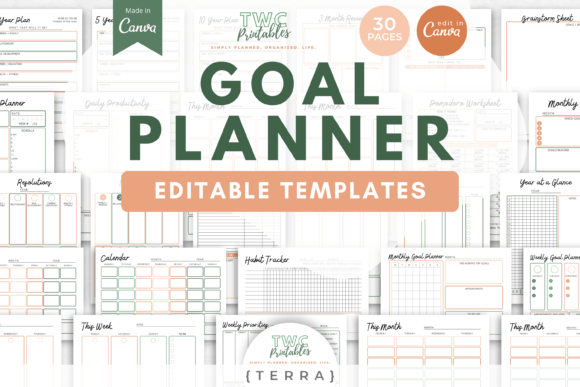
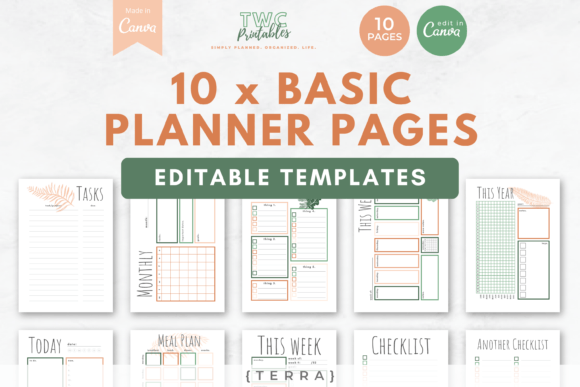
The defining feature of this collection is its visual personality. The design utilizes a palette of shades of terracotta and green. These are not just arbitrary colors; in modern typography and graphic design, earth tones are known to reduce stress and increase focus. Terracotta offers warmth and energy, while the greens provide balance and a connection to nature.
This color scheme creates a sophisticated, organic aesthetic that feels premium without being pretentious. It appeals to a wide range of users, from the minimalist entrepreneur to the creative crafter. The visual hierarchy is clear and functional, ensuring that your to-do lists and meal plans are easy to read at a glance. Whether you are using this for personal journaling or commercial project management, the "Terra" style adapts seamlessly to your environment.
Anatomy of the 10-Page Collection
Utility is the backbone of good editorial design, and this set delivers exactly what you need. The package includes a variety of layouts designed to handle different aspects of life and business. You are not getting a generic stack of papers; you are getting a curated system.
The collection includes the following specific sheets:
- 1 x Daily planner: For granular hour-by-hour scheduling.
- 2 x Weekly planners: To view your week at a glance.
- 1 x Monthly planner: Essential for tracking long-term deadlines.
- 3 x Checklists: Perfect for inventory, packing lists, or daily tasks.
- 1 x Tasks/projects sheet: Dedicated space for larger project management.
- 1 x Yearly tracker: Ideal for habit tracking or content calendars.
- 1 x Weekly meal plan: A must-have for nutritionists or busy parents.
The variety here allows for a comprehensive approach to planning. You can mix and match these pages to create a physical binder that suits your specific workflow.
Customization: Total Control in Canva
One of the strongest aspects of these Canva Planner Templates is the level of control they offer. While the default design is beautiful, Canva allows you to alter every single element. If the terracotta does not fit your brand identity, you can change the hex codes in seconds.
You have the freedom to swap out the fonts to match your personal style. If you prefer a sans serif font for a modern, clean look, you can do that. If you want a script font for a more elegant, feminine touch, that is also an option. The templates support both A4 and US letter sizes, ensuring compatibility with printers worldwide. This flexibility makes the templates suitable for a wide range of projects, from social media graphics planning to physical packaging design schedules.
Practical Application for Professionals
For designers, entrepreneurs, and content creators, time management is critical. These templates serve as more than just a calendar; they are a strategic asset. Here is how different professionals can leverage them:
- For Marketers: Use the Yearly Tracker to plan campaign launches and the Weekly Planners to schedule social media content.
- For Bloggers: The Tasks/Projects sheet is excellent for mapping out editorial calendars and tracking article drafts.
- For Small Business Owners: The Daily Planner helps manage client meetings, while the Meal Plan can assist in organizing catering or team lunches.
The tactile experience of writing down goals has been shown to increase retention. By printing these sheets, you create a physical artifact of your productivity that digital apps often fail to replicate.
Important Technical Details
Before purchasing, it is vital to understand the technical specifications to ensure the product fits your needs. These are not fillable PDF files. This means you cannot type directly into the boxes on a PDF viewer. Instead, the workflow is designed around the free Canva platform.
You will edit the templates in Canva to customize the design, and then print them out to be filled in by hand. This is perfect for those who prefer the analog experience of writing with a pen. However, if you require a strictly digital, type-able planner, this specific set may require a different workflow. The "Terra" design is optimized for print, ensuring that the visual hierarchy remains crisp on paper.
Bonus Content and Value
The package includes a significant value-add: 10 free sheets available upon signing up via email. This allows you to expand your planner beyond the initial 10 pages. The bonus content is accessible through a link provided in the purchase documentation, allowing you to play around with additional designs that complement the "Terra" aesthetic.
This is an excellent opportunity for those who want to experiment with different layouts before committing to a specific structure. It is a practical way to test how the templates work within your actual daily routine.
Conclusion: Elevating Daily Organization
The Canva Planner Templates | 10 Pages offer a harmonious blend of aesthetic appeal and functional design. They are an ideal solution for anyone looking to bring order to their personal or professional life without sacrificing style. By leveraging the power of Canva’s editing tools, you can create a planner that is truly your own.
Whether you are a crafter organizing your supply list or a publisher tracking print runs, these templates provide the structure you need. The earthy, organic feel of the "Terra" design ensures that your planning process is not just productive, but also visually pleasing. It is a reminder that organization can be beautiful.