140 Mouse Mat Templates: Your Sublimation Shortcut
If you've spent any time in the sublimation printing world, you know the drill: you find a great mouse mat substrate, you get your heat press ready, and then you spend hours fiddling with design software trying to create a layout that actually looks professional. It's a time-consuming process that can stall even the most enthusiastic crafter or small business owner. That's where a solid collection of 140 Mouse Mat Templates for Sublimation comes in—not as a magic solution, but as a practical starting point that respects your time and creative energy.
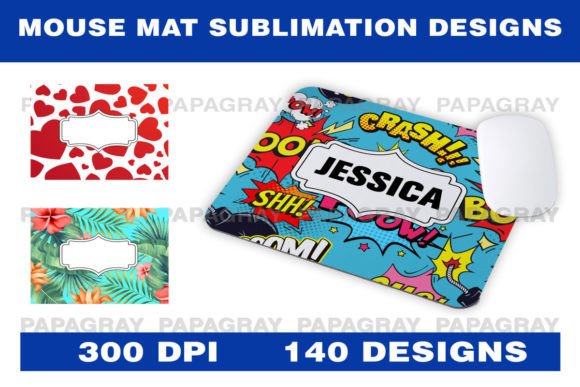
This isn't about handing you a finished product. It's about giving you a robust library of design foundations. Each of the 140 designs arrives as a high-resolution PNG file at 300 DPI, perfectly sized at 27cm x 22cm. That's print-ready quality, meaning no guesswork about resolution or dimensions. The real value, however, lies in the "template" part. These are designed with clear, editable areas—spaces intentionally left for you to add your own text, logos, or custom graphics. Think of them as professional-grade backgrounds and layout structures that solve the hardest part of the design process: composition.
More Than Just a Pretty Background
The visual personality of these templates is intentionally varied. You'll find designs that lean into modern typography with clean, sans serif font layouts, perfect for tech-focused or corporate branding. Others incorporate script font or handwritten font elements, ideal for boutique shops, personalized gifts, or lifestyle brands seeking a softer, more artisanal feel. There are also minimalist geometric patterns, bold abstract art, and themed illustrations. This diversity is key; it allows you to select a base that aligns with your specific project's tone, whether it's for a client's brand identity or your own hobbyist craft.
From a practical design standpoint, a good template does more than look nice. It establishes a visual hierarchy. The pre-designed elements guide the eye, creating a natural focal point for the text or logo you'll add. This is crucial for readability and impact. A mouse mat is a functional item seen daily, often in a work setting. A cluttered or poorly composed design can feel distracting, while a well-structured one can subtly reinforce a brand's professionalism every time the user sits down at their desk.
Where These Templates Truly Shine
The applications extend far beyond personal mouse mats for your home office. For entrepreneurs and small business owners, this collection is a toolkit for creating branded merchandise without hiring a designer for every single item. Imagine offering custom mouse mats as corporate gifts, promotional items for trade shows, or products in your online store. With 140 designs, you can create a cohesive product line with variety, ensuring your brand identity remains consistent across different styles while avoiding repetition.
Crafters and hobbyists will find a treasure trove for personalized projects. Think beyond the mouse mat: the templates are sized for other sublimation blanks like coasters, small trays, or even decorative tiles. Create a matching set for a home office, design unique gifts for a bridal party, or make custom merchandise for a local club or team. The PNG format is universally compatible with most design software, from professional suites like Adobe Photoshop to beginner-friendly programs like Canva, making the barrier to entry low.
For designers and content creators, these assets streamline mockup creation and client presentations. Instead of building every design from scratch, you can quickly prototype ideas, showing clients how their logo might look on a physical product. This speeds up the approval process and demonstrates a higher level of service. The templates serve as excellent design assets in your toolkit, much like a versatile premium font or a library of icons.
Working With the Templates: A Practical Guide
Getting the most out of these Mouse Mat Templates for Sublimation requires a bit of strategy. First, don't treat them as immutable. Their purpose is to be customized. Open the PNG in your preferred editor. Use the existing design as a guide for placement and scale. If the template features a central banner, that's where your company name in a strong display font should go. If it has a subtle pattern, consider how a contrasting serif font for a tagline might add sophistication.
Testing is non-negotiable. Always do a test print on plain paper to check sizing and composition before using sublimation paper and a blank. This simple step saves ink, material, and frustration. Pay close attention to how your chosen text interacts with the template's elements. Is it readable from a typical viewing distance? Does the color contrast meet accessibility standards? A beautiful design that fails on readability is a failed design.
Consider your font pairings carefully. If the template itself incorporates a creative font style, choose your added text in a complementary, often simpler, typeface to avoid visual competition. For a template with a busy background, a clean sans serif font for your main text ensures clarity. This is where understanding basic font pairing principles pays off—it's about creating harmony, not a font clash.
Finally, think about commercial licensing. Since these are digital downloads, the license typically covers the right to create and sell end products (like the printed mouse mats) but not to resell the digital files themselves. This is standard for commercial font and asset licenses. It's a model that supports your business growth while respecting the original creator's work.
In essence, this collection of 140 templates is a catalyst. It removes the initial creative block of "where do I start?" and lets you focus on what truly matters: adding your unique text, refining the details for your audience, and producing a polished, professional product. It’s a practical resource built for real-world use, designed to help you create with efficiency and confidence.